What to Look For in a Chore App for Adults
Nobody hands you a chore chart when you move out. The laundry piles up, the bins get missed, and the oven quietly waits for a day that never comes. A to-do list helps for a week; then it turns into a list of things you feel bad about.
 Choru is an iPhone appPoint your iPhone camera at the code to install it.
or text me the link
The short answer
A chore app for adults earns its place if it does four things a plain to-do list does not: it brings each chore back on its own rhythm, it tells you once a day what is due instead of pinging you for every job, it keeps a missed chore in front of you without piling up copies, and it gives you a small reason to tick things off. Everything else is decoration.
Start with what is already on your iPhone. The built-in Reminders app can give a reminder a date and time, share a list, and assign a reminder to someone on a shared list. On iOS 26.2 and later, with iCloud Reminders set up, you can also mark a reminder as Urgent: Reminders schedules an alarm for when it is due, and Apple says the alarm goes off even when the phone is silenced or a Focus is on. For a short list of chores, that may be all you need (see Reminders first). What Reminders does not do is keep any score: no streak, no rewards, and nothing that adds up what you got done this week. If those are the parts that would keep you going, that is what a dedicated chore app is for, and the rest of this guide shows what to check for and why it works.
Try the Reminders app first
It costs nothing to try, and it tells you quickly whether a list on your phone works for you at all.
- Open Reminders and make a list called Chores.
- Tap New Reminder and type the chore, for example Take out the bins.
- Tap the Date and Time button and pick Today, Tomorrow, This Weekend or Next Week, or Custom for a set day. A date with no time notifies you at 9:00 AM.
- For a chore you cannot afford to miss, open its Info button and, under Date & Time, turn on Urgent (iOS 26.2 or later, with iCloud Reminders). If the alarm never shows up, check that Reminders is allowed to use alarms in the Settings app.
- Living with someone? Tap the list, tap the Share button and send the invitation. Once it is shared, tap a reminder, tap the Assignment button and pick who it belongs to.
One thing to know before you rely on a shared list: Apple says the notifications you set on your reminders are not shared with anyone else, so each person sets their own. There is a longer look at where this approach holds up and where it stops in can you use the iPhone Reminders app for chores.
Give it two weeks. If you are still ticking things off, you may not need anything else. If the list has turned into a wall of overdue items you scroll past, read on.
Every chore needs its own rhythm
Adult chores do not run on one schedule. The dishes are daily, the sheets every week or two, the fridge monthly, the oven every few months. A list where everything is either "today" or undated cannot hold that, so the rare jobs drop off and come back only when they have become big jobs.
So the first thing to check in any chore app is how flexible the repeats are. You want daily, set weekdays, weekly and monthly at the least, plus a custom rhythm like every 3 days or every 6 months. You also want jobs with no fixed date, like descaling the kettle, to come back a set time after you last did them rather than on a calendar date you will miss anyway.
In Choru, each chore picks its own Repeat: daily, specific days, weekly, monthly, quarterly, or Custom for every few days, weeks, months or years. Jobs with no fixed date can be anytime tasks: tick one off whenever you get to it, and it comes back a month, three months, six months or a year later. If a blank list is the hard part, the Chores tab offers Start from a list: tick the starter chores your home needs, and the slower ones are spread over the coming week so nothing lands on one day. For a full list of monthly, quarterly and yearly jobs, see the deep cleaning schedule.
One nudge a day, not one per chore
A reminder for every chore sounds helpful until there are fifteen of them. Each alert is small, and together they teach you to swipe them away without reading. A single summary at a time you choose, naming what is due, asks for your attention once.
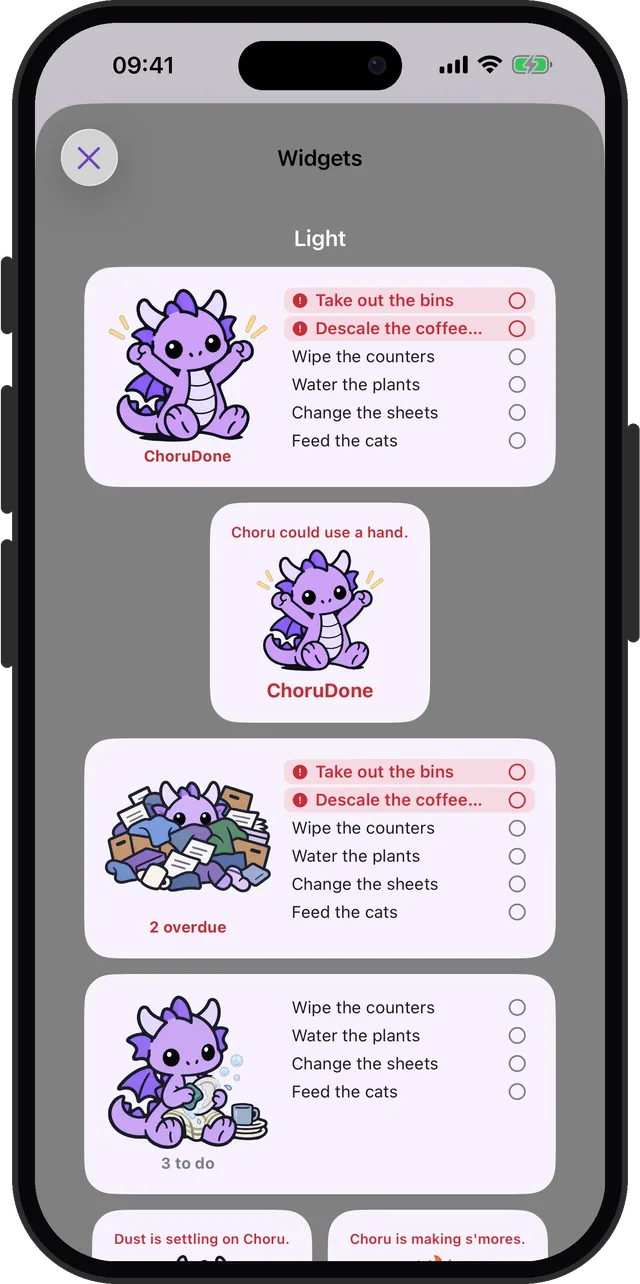
Choru works this way. In Settings, under Notifications, turn on Daily summary and set the time in the At row. You can also turn on Badge shows overdue, so the app icon tells you when something has slipped without sending another banner. Home Screen widgets show today's list too, with overdue chores marked in red, so a glance at your phone does the reminding.
Missed chores should wait, not multiply
You will miss chores. What matters is what the app does next. On paper, a missed job simply disappears. Some apps go the other way and create a new overdue copy for every missed day, so a week away leaves seven of the same chore waiting for you, which is a good reason to stop opening the app.
The pattern that works is one entry per chore, carried forward to today, saying how late it is. In Choru, a missed chore carries over to today as one row marked with how late it is, and ticking it settles it and puts it back on its normal rhythm. Three more things help on bad days:
- Move it once. Swipe an open chore and tap Tomorrow to move it a day. It can be moved once; after that it has to be done before it can be moved again, so it cannot drift forever.
- Rest days. In Settings, under Away, tap the weekdays you want off under Rest days. Nothing is due on them.
- Days away. In the same section, tap Days away, pick the days of a trip and tap Mark as away, so no pile is waiting when you get back.
If the same chore is overdue every week, the rhythm is wrong, not you. Move it from weekly to every two weeks and see if it holds. There is more on this in how to manage household chores.
Rewards for adults: pair the chore with something you want
Adults rarely get a sticker for cleaning the bathroom, and the reward of a clean bathroom arrives slowly. There is research on closing that gap. In a study by Katherine Milkman and colleagues, published in Management Science in 2014, participants who could only listen to tempting audiobooks at the gym initially visited the gym 51 percent more often than a control group. The researchers called it temptation bundling. The effect faded over the nine weeks and had worn off after a Thanksgiving break, when participants left campus, so a reward works best when it stays tied to the task and you keep it going.
You can use the same idea with chores in two ways:
- Bundle. Keep a podcast or a series for chore time only. The laundry is when you hear the next episode.
- Earn. Pick a reward you actually want, like takeaway on Friday or an evening with no chores, and earn it with the week's jobs.
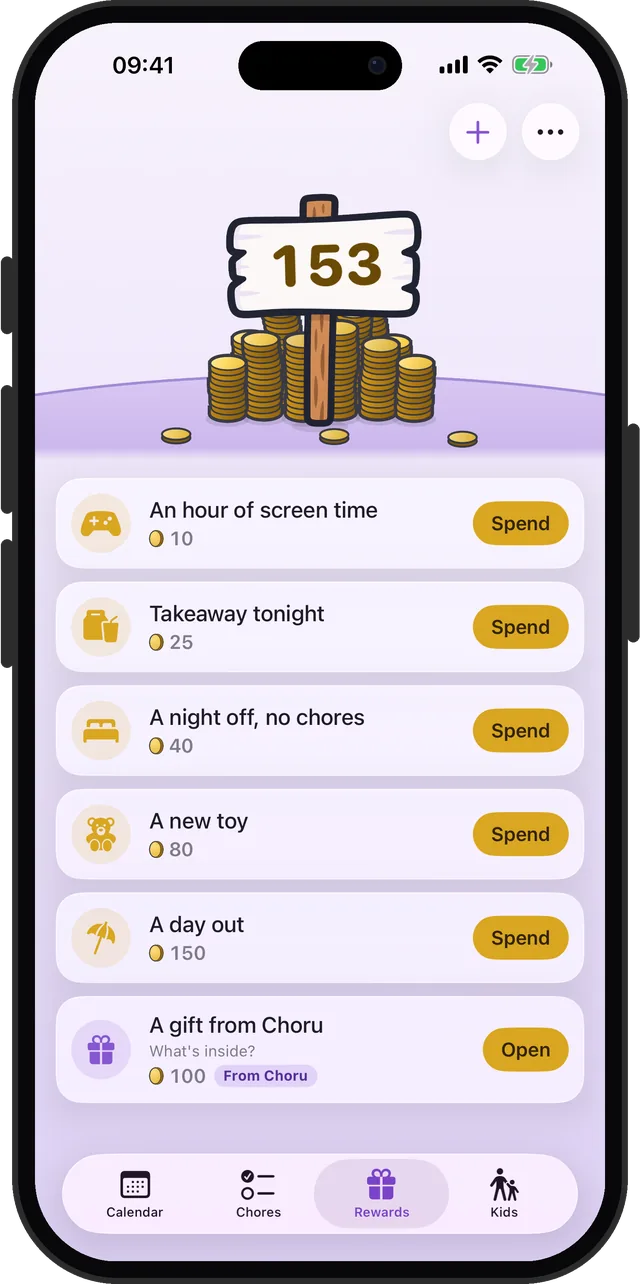
In Choru, every chore pays 1, 2 or 3 coins when you tick it, and you choose how many. In the Rewards tab you write your own rewards and set their prices, and when the balance covers one, you tap Spend. While you set a price, Choru estimates how often you could earn it at your current pace, so you can make the first reward close enough to reach. A streak of days with everything due done adds bonus coins at 3, 7, 14 and 30 days. Nothing in this needs kids: adults have their own balance and their own rewards. The coins are a tally inside the app, not money, so the reward is a deal you keep with yourself.
If you have ADHD
The US National Institute of Mental Health lists trouble remembering daily tasks, being forgetful in activities, disorganization and procrastination, and poor time management among the signs of ADHD, and notes that adults with ADHD may find it hard to stay organized and keep appointments. Housework asks for exactly those skills, every day, with no deadline from anyone else.
An app is not a treatment. But some of the skills taught in treatment map onto what a chore app can do. In a randomized trial at Massachusetts General Hospital, published in JAMA in 2010, 86 adults with ADHD who were already on medication and still had symptoms got either cognitive behavioral therapy or relaxation training with education. The CBT taught calendar and task-list systems, breaking overwhelming tasks into steps, and coping with distraction, including timing one's attention span. On one clinician-rated scale, 53 percent of the CBT group responded, against 23 percent in the comparison group.
What that suggests for picking a chore app:
- The app holds the list, not your head. Every chore lives in one place with its next date, so nothing depends on remembering it.
- Small steps beat one big job. "Clean the kitchen" is hard to start. "Wipe the counters" and "Empty the dishwasher" are easy to start. Split chores until each one is a few minutes.
- Work in timed bursts. A timer turns an open-ended job into a finite one. Choru has one: tap the timer button on the Calendar tab to set a timed tidy of 1 to 30 minutes. It is just a timer; when it ends you tick off what you actually did.
- Decide when, in advance. A review of 94 tests by Peter Gollwitzer and Paschal Sheeran found that if-then plans ("When I finish dinner, I wipe the counters") had a medium-to-large effect on reaching goals. Give each daily chore a trigger like that.
- Make a miss cheap. Carry-over, rest days and a one-time move to tomorrow mean one bad day does not turn into a wall of red (see missed chores).
Living with someone
Adult chores often belong to two people, and the work of remembering them can land on one. A shared list with an owner for each chore takes that weight off. In Choru, open Settings, then Family, and start a family; the other person scans the code with Choru on their own iPhone, and each chore's For row says whose it is. Stats then count each person's chores for the week. How to split the jobs so it feels fair is covered in how to split chores fairly with your partner.
A quick checklist
| Check | Why it matters | See |
|---|---|---|
| Flexible repeats | The rare jobs come back | Rhythm |
| One daily summary | Alerts stay worth reading | Nudge |
| Carry-over as one row | A miss does not multiply | Misses |
| Rewards you choose | A reason to tick today | Rewards |
| A timer | Small, finite bursts | ADHD |
Choru is for iPhone and needs iOS 26.5 or later. It has no free version; the yearly plan starts with a free trial, and the App Store listing shows current prices.
Frequently asked questions
What is the best chore app for adults?
Look for four things: repeats that fit each chore, one daily summary instead of an alert per job, missed chores that carry over as one entry, and rewards you set yourself. Try the built-in Reminders app first; if you want streaks, rewards or a weekly tally, a chore app such as Choru adds those.
Is there a chore app for adults with ADHD?
No app treats ADHD, but some features match skills taught in therapy for adult ADHD: keeping tasks in one list, breaking them into small steps and working in timed bursts. A chore app that holds the schedule, sends one daily summary and makes a missed day cheap can take some of the remembering off you.
What are good rewards for doing chores as an adult?
Something you actually want that is close enough to earn: takeaway at the end of the week, an evening with no chores, or a podcast you only play while cleaning. Research on temptation bundling found that pairing a treat with a task got people to the gym more often at first, though the effect faded over the weeks, especially after a holiday break.
Can I use the iPhone Reminders app for house chores?
Yes, for a short list. Reminders can set dates, share a list and assign reminders to people, and on iOS 26.2 or later, with iCloud Reminders, an Urgent reminder sets off an alarm when it is due, even with the phone silenced. It has no streaks, rewards or tally of what got done.
How do I stop my chore list from becoming overwhelming?
Give each chore its own rhythm so not everything is due at once, split big jobs into a few minutes each, and set rest days. If one chore is overdue every week, make it less frequent rather than forcing it.
Sources
- MacRumors: Set alarm-style iPhone reminders in iOS 26.2
- Apple Support: Use Reminders on your iPhone or iPad
- Apple Support: Share and assign reminders on your iPhone or iPad
- National Institute of Mental Health: ADHD, what you need to know
- National Institute of Mental Health: Attention-Deficit/Hyperactivity Disorder
- Safren et al. (2010), Cognitive behavioral therapy vs relaxation with educational support for medication-treated adults with ADHD, JAMA
- Milkman, Minson and Volpp (2014), Holding the Hunger Games hostage at the gym: an evaluation of temptation bundling, Management Science
- Knowledge at Wharton: Using 'The Hunger Games' to encourage healthier choices
- Gollwitzer and Sheeran (2006), Implementation intentions and goal achievement: a meta-analysis (University of Konstanz repository)