How to Share a Chore List With Your Family on iPhone
A chore list only works if everyone can see it. The fridge door works until someone is not at home. Here are three ways to put the list on your family's iPhones, and what each is good for.
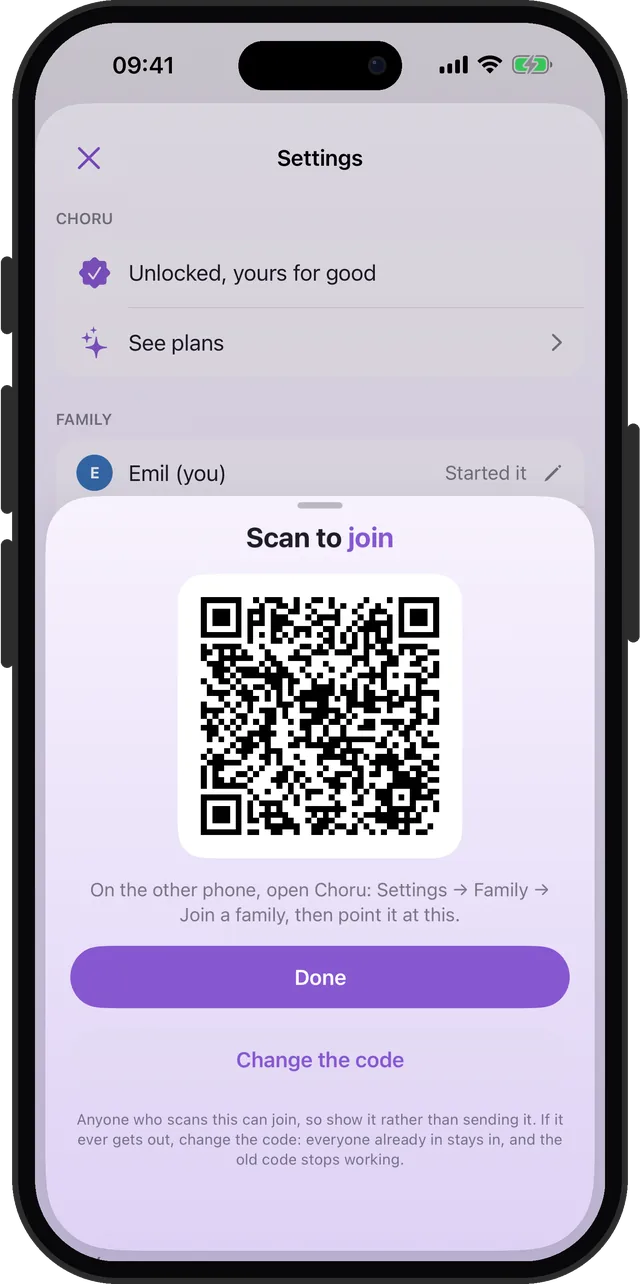
Quick answer: For a one-off list, share a checklist in the built-in Notes app or a list in Reminders. For chores that repeat and belong to someone, use a family chore app. In Choru, start a family in Settings, show the code, and each person scans it with their own iPhone. Everyone then sees the shared chores on their own phone.
1. A shared note
Quick and free. Share a checklist in the Notes app, and everyone can tick items off. It falls apart with chores that repeat: a ticked item stays ticked until somebody unticks it, and the note cannot tell you when a job is due again.
2. A shared list in Reminders
Better. The built-in Reminders app can repeat, and in a shared list you can assign items to people. For a couple with a short list, it works. What it lacks is any tally of who did what, and anything for kids. There is a longer look at Reminders for chores.
3. A family chore app
A chore app keeps the repeats, gives each chore a person, and keeps track of what got done. Here is how it works in Choru:
- Open Choru, go to Settings, then Family, and start a family.
- Choru shows a code. On the other iPhone, open Choru, go to Settings, then Family, then Join a family, and point the camera at the code.
- That is it. Everyone now sees the family's chores on their own phone.
- Put a chore on someone's list with the For row when you add or edit it.
Good to know
- Up to five people. A family in Choru can have five members, each on their own iPhone with their own Apple Account.
- Show the code, do not send it. Anyone who scans it can join. If it ever gets out, change the code: everyone already in stays in, and the old code stops working.
- Leaving is easy. Leave from Settings, Family. Your own chores, streak and coins stay on your phone.
- Kids can join too. A kid's phone locks itself to their own list. More in the kids' chore chart guide.
One chore list for the whole family
Start a family, show the code, and everyone sees the shared chores.